 Virtual Pantry for iPhone
Know when your food expires.
Keep track of the food in your fridge, freezer and pantry. Scan a barcode or a grocery receipt, get an expiry date and a reminder before it goes off.


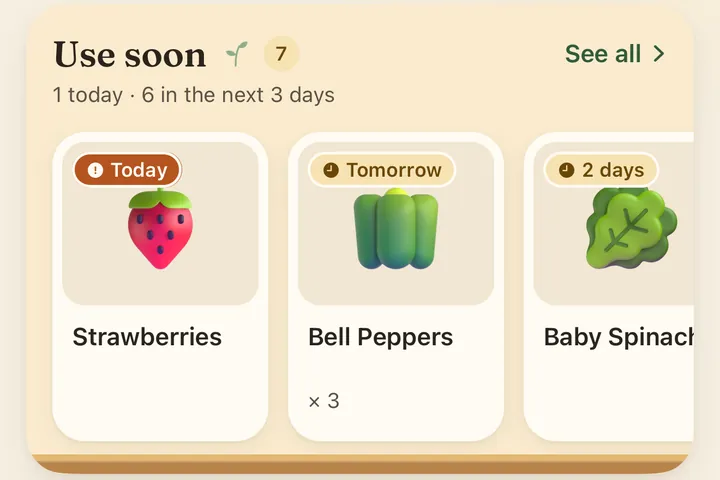
Eat these first
1 today · 2 in the next 3 days
 StrawberriesToday
 Whole milkTomorrow
 Baby spinach2 days



- 3 placesFridge, freezer and pantry, ready from the start
- 3 daysbefore its date, food moves up to Use soon
- 4 remindersfor each food, from a week out to the day after
- 58 food guideson how long food keeps, free on this site
What it does
Your kitchen, sorted.
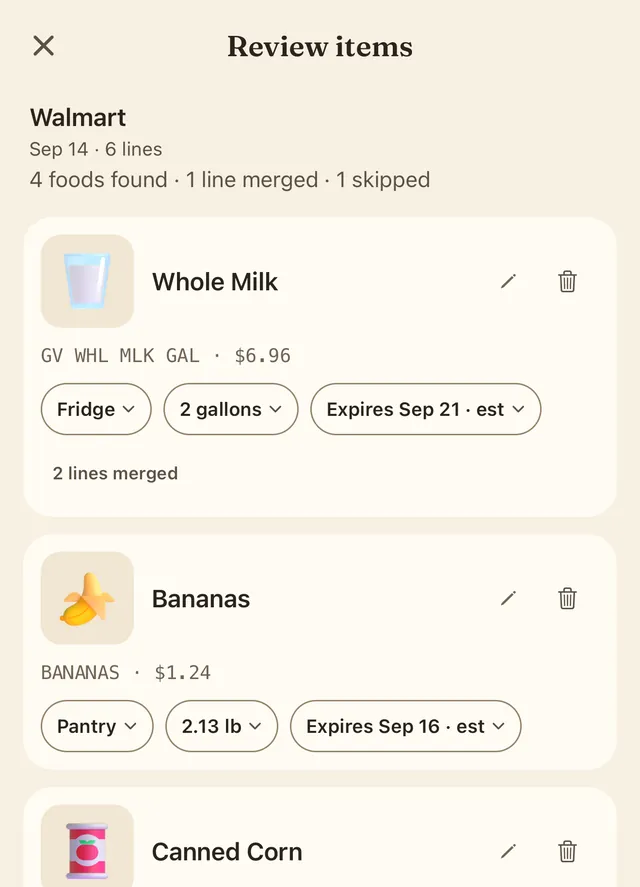
Scan a receipt
Snap the receipt after a shop and Virtual Pantry gives each food on it a shelf and a date.
Scan a barcode
Point the camera at it and the name fills itself in. Or just type it.
Shelf-life estimates
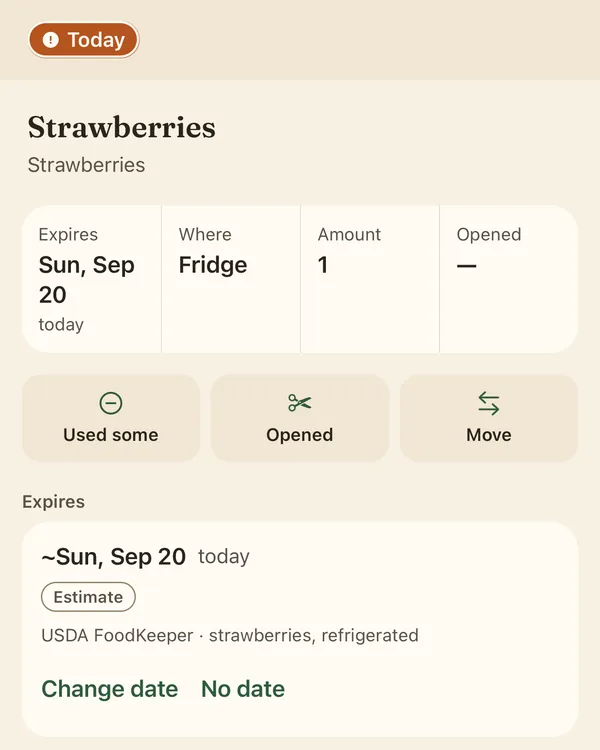
Every food you add gets a realistic expiry date, and a date you fix stays fixed.
What to eat first
Anything due in the next three days moves up to the Use soon shelf, so you cook it before it turns.
Save recipes you find online.
Share a recipe from Safari, Instagram or another app and it lands in your cookbook.
- Plan
Plan the week with Home Menu.
A weekly menu built around the food already on your shelves, with your diets and allergies kept in mind.
- Plan
Share one pantry with your household.
Invite the people you live with by QR code or link: one set of shelves and one shopping list for everyone.
Inside the app
A look at your shelves.
Pick a screen to see it.

Virtual Pantrynow
Milk expires today
It's in the Fridge. Tap to mark it used or tossed.
How it works
Three steps, then it runs itself.
Step 1: Scan
Scan your receipt or a barcode.

Step 2: It sorts itself
Each food gets a shelf and a date. Check them and change anything you like.

Step 3: Eat it first
Get a reminder, then cook from Use soon.

Pricing
Free for up to 10 items.
Free
Up to 10 items
- Shelves for the fridge, freezer and pantry
- Receipt and barcode scanning
- Reminders and the Use soon shelf
- A shopping list
Home Menu
$13.99 /month
- No limit on your shelves
- A weekly menu built around the food you already have
- Diets and allergies respected, including halal and kosher
- What's missing goes to your shopping list
- Everyone in your household on the same plan
Household
$9.99 /month
- No limit on your shelves
- Invite the people you live with by QR code or link
- Shared shelves, reminders and shopping list
US prices. The App Store shows the price in your currency. Cancel any time in iPhone Settings.
Food guides
How long does food last?
Fridge, freezer and pantry times for common foods, from the USDA FoodKeeper tables.




A Potter Software app
Made by a college student, not a big company.
Jeremy Potter builds Virtual Pantry on his own, from the app to this website, for anyone who keeps finding forgotten food at the back of the fridge.
Good to know
Questions
Where do the expiry dates come from?
Every food gets a realistic date when you add it. They're estimates for food stored properly, so trust your senses and the package date too. You can change any date.
Is it free?
Free for up to 10 items on your shelves, with scanning, dates, reminders and the shopping list. Household and Home Menu remove the limit. Both are optional monthly subscriptions, billed through your Apple ID.
Do I need an account?
Yes. Create one with Apple, Google or email; it keeps your shelves backed up and in step between your devices.
How do households work?
Invite the people you live with by QR code or link. You share one set of shelves and one shopping list, and with Home Menu one weekly menu too. Households are an optional subscription.
How do I save a recipe?
Share a recipe from Safari, Instagram or another app and it lands in your cookbook.
How do reminders work?
Each food gets a reminder a week before its date, three days before, on the day and the day after, at a time you pick. Change them in Settings, or give any food its own.
How do I get help?
Write to us on the support page and we'll reply by email.
Start with what's in your fridge.
Scan your next grocery receipt and every food gets a shelf and a date.
Get Virtual Pantry on the App StoreGet Virtual Pantry news by email
New features, new food guides and kitchen tips. Only when there's news. Unsubscribe any time.